
Skill Library
The window for learning skills of every class: search in English or Russian, filters by role, stars and class, "need / have" prices and one-click learning.
Contents
Vela has more than a thousand skills you can learn. In the client's native window (Alt+K) that turned into an endless list, so foreign skills are learned in the Skill Library — a separate window with search, filters and skill cards. Your own class skills still come by themselves, and Alt+K only shows them plus the next levels of foreign skills you've already learned.
What's in the window
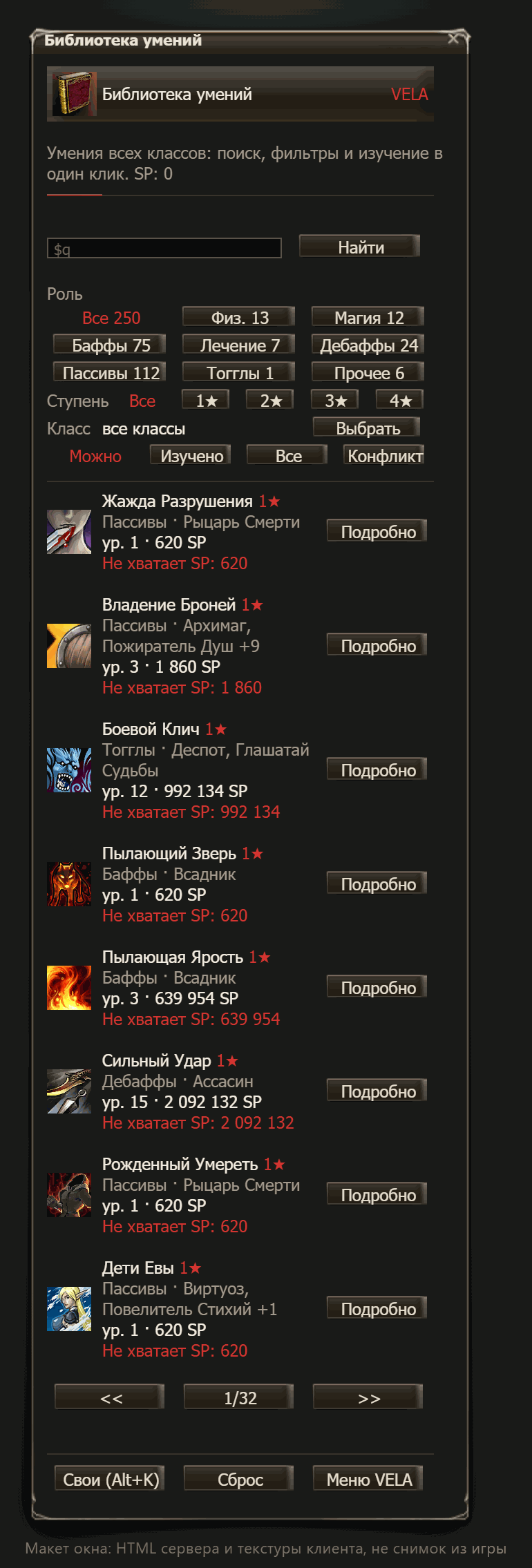
At the top: your SP and the search bar. Below are four rows of filters, and under them a list of 8 skills per page with "<< 1/N >>" paging. The selected filter is shown as red text instead of a button.
| Filter | Options | What for |
|---|---|---|
| Search | part of a name, in Russian or English, a number #id | find a specific skill |
| Role | Phys., Magic, Buffs, Heals, Debuffs, Passives, Toggles, Other | build by task |
| Tier | All, 1★, 2★, 3★, 4★ | separate quick skills from expensive ones |
| Class | all classes, or "Choose" → race → class | see a whole class line |
| Show | Learnable, Learned, All, Conflict | what's available now, what you have, what won't add up |
- Role is based on what the skill actually does: attack, healing and resurrection, buffs, debuffs, passives, toggles.
- Class is picked on the race page: Humans, Elves, Dark Elves, Orcs, Dwarves, Kamael. The list includes every skill of the class line up to the 3rd profession, together with the common skills of its parent classes.
- Show "Learnable" — what you can learn right now. If it's empty, look at "All": new skills open up with level and profession.
- Show "Conflict" — skills that would run into foreign skills you already know from the same stacking group: you can learn them, but only one will work.
- Search switches the Show filter to "All" by itself. The Clear button empties the search bar, Reset at the bottom clears all filters.
Skill card
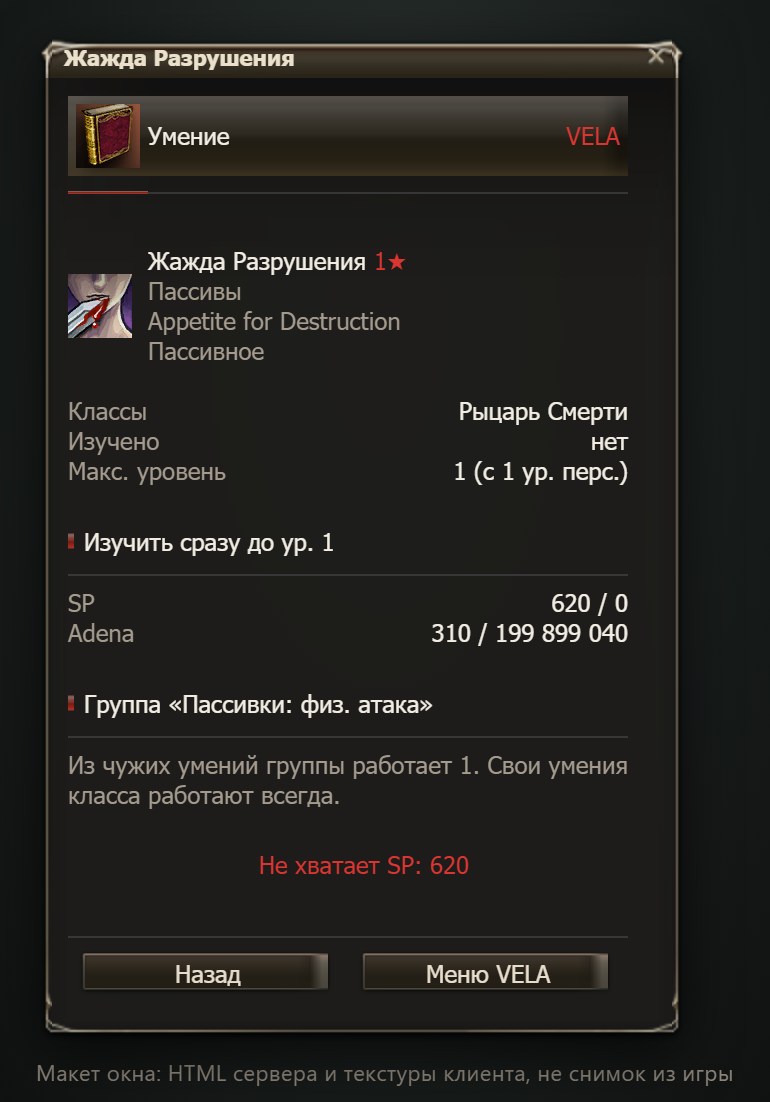
The Details button (or the icon) opens the skill card:
- icon, star, role and a short description: type, target, MP cost, cooldown, duration, range;
- which classes own the skill, whether you've learned it and up to what level, and the max level;
- the "Learn up to lv. N" block: SP and Raid Marks in "need / have" format;
- "Replaces: …" — if the skill belongs to a passive family and will push out one you already know;
- the "Group "…"" block — the stacking group and what from it is already working for you; a red "Will not add up: you know …" warns about a conflict;
- the Learn button, or the reason you can't;
- for a foreign skill you've learned — a Forget (50% SP) button.
Why you can't learn it
Instead of the button, the card shows a reason:
| Message | What to do |
|---|---|
| Needs the Nth class | change profession: the skill's tier is above yours |
| Needs level N | level up to the learning level |
| Needs N rebirths | 3★ skills open after 1 rebirth, 4★ after 5 |
| Not enough SP | farm, or get SP back by forgetting a foreign skill you don't need |
| Missing: Raid Mark N | kill raid bosses: every RB 20+ drops 1–3 Marks |
| Fully learned | no new levels yet |
| Your class skill | it comes by itself as you level |
| Cannot learn while transformed | leave the transformation |
Price and "straight to max"
The "Learn" button gives you the highest level right away that's available at your character level, and charges the sum of all the levels you skip. It takes SP, adena (half the SP amount), and for 3★ and 4★ also Raid Marks (2 and 5 per purchase). If the price changed while the window was open (for example, you gained a level), the window says "The offer has changed…" and charges nothing — just press again.
After learning, a red "Learned: …" appears at the top, and the skill shows up in Alt+K. How prices and stars are calculated is explained in Multiprofa.
Alt+K and the Library
| Window | What it shows |
|---|---|
| Alt+K → learn tab | your own class skills and the next levels of foreign skills you know |
| Skill Library | every skill of every class, search, filters, "why not" reasons |
The Own (Alt+K) button in the Library opens the native window, and VELA menu takes you back to the main menu. If the learn tab in Alt+K is empty, that's normal: your own skills are learned automatically, and foreign ones are learned here.
Tips
- Start with the Role›Buffs filter and Learnable: collect a full set of buffs in your first week, then attack skills.
- Before buying a passive, check the group block: if a foreign skill from that group is already working, the second one will just "wait".
- The class filter is handy for grabbing skills "like a Prophet" or "like a Warlord" without searching one by one.
- The window remembers your filters until you log out.